Створення та транспіляція власних Backend-ів
# Added by doQumentation — installs the packages this notebook needs if they are missing
import importlib.util

_needed = {"numpy": "numpy", "qiskit": "qiskit", "rustworkx": "rustworkx"}
_missing = [pip for module, pip in _needed.items()
            if importlib.util.find_spec(module) is None]
# One at a time, so a package that fails to install does not block the others
for _pip in _missing:
    %pip install -q {_pip}
if not _missing:
    print("\u2713 All required packages are installed")
# Don't use SVGs for this file because the images are too large,
# and the SVGs are much larger than their PNGs equivalents.
%config InlineBackend.figure_format='png'
Версії пакетів
Код на цій сторінці розроблено з використанням наведених нижче залежностей. Рекомендуємо використовувати ці або новіші версії.
qiskit[all]~=2.5.2
Одна з найпотужніших можливостей Qiskit — підтримка унікальних конфігурацій пристроїв. Qiskit спроектований так, щоб бути незалежним від постачальника квантового обладнання, яке ти використовуєш, а постачальники можуть налаштовувати об'єкт BackendV2 відповідно до власних унікальних характеристик пристрою. У цьому розділі показано, як налаштувати власний Backend і транспілювати квантові схеми проти нього.
Ти можеш створювати унікальні об'єкти BackendV2 з різними геометріями або базисними вентилями та транспілювати свої схеми з урахуванням цих конфігурацій. Наведений нижче приклад охоплює Backend з роз'єднаною ґраткою кубітів, базисні вентилі якого відрізняються на ребрах від тих, що всередині об'єму.
Розуміння інтерфейсів Provider, BackendV2 та Target
Перш ніж починати, корисно розуміти призначення та використання об'єктів Provider, BackendV2 та Target.
-
Якщо у тебе є квантовий пристрій або симулятор, який ти хочеш інтегрувати в Qiskit SDK, тобі потрібно написати власний клас
Provider. Цей клас виконує єдину функцію: надає об'єкти Backend, які ти визначаєш. Саме тут обробляються всі необхідні облікові дані та/або автентифікаційні завдання. Після ініціалізації об'єкт провайдера надасть список Backend-ів, а також можливість отримувати/ініціалізувати їх. -
Далі, класи Backend забезпечують інтерфейс між Qiskit SDK та обладнанням чи симулятором, що виконуватиме схеми. Вони містять усю необхідну інформацію для опису Backend транспілятору, щоб він міг оптимізувати будь-яку схему відповідно до обмежень.
BackendV2складається з чотирьох основних частин:-
Властивість
Target, яка містить опис обмежень Backend і надає транспілятору модель Backend -
Властивість
max_circuits, що визначає ліміт кількості схем, які Backend може виконати в одному завданні -
Метод
run(), який приймає подання завдань -
Набір
_default_optionsдля визначення параметрів, що конфігуруються користувачем, та їхніх значень за замовчуванням
-
Створення власного BackendV2
Об'єкт BackendV2 — це абстрактний клас, що використовується для всіх об'єктів Backend, створених постачальником (як у qiskit.providers, так і в інших бібліотеках, наприклад qiskit_ibm_runtime.IBMBackend). Як зазначалося вище, ці об'єкти містять кілька атрибутів, зокрема Target. Target містить інформацію, що описує атрибути Backend — наприклад, Coupling Map, список Instructions та інші — для транспілятора. Крім Target, можна також визначити деталі на рівні імпульсів, наприклад DriveChannel або ControlChannel.
Наведений нижче приклад демонструє це налаштування шляхом створення симульованого багатокристального Backend, де кожен кристал має зв'язність типу heavy-hex. У прикладі набір двокубітних вентилів Backend задається як CZGates всередині кожного кристала та CXGates між кристалами. Спочатку створи власний BackendV2 та налаштуй його Target з однокубітними та двокубітними вентилями відповідно до описаних вище обмежень.
Для побудови графу зв'язності потрібно встановити бібліотеку graphviz.
import numpy as np
import rustworkx as rx

from qiskit.providers import BackendV2, Options
from qiskit.transpiler import Target, InstructionProperties
from qiskit.circuit.library import XGate, SXGate, RZGate, CZGate, ECRGate
from qiskit.circuit import Measure, Delay, Parameter, Reset
from qiskit import QuantumCircuit, transpile
from qiskit.visualization import plot_gate_map

class FakeLOCCBackend(BackendV2):
    """Fake multi chip backend."""

    def __init__(self, distance=3, number_of_chips=3):
        """Instantiate a new fake multi chip backend.

        Args:
            distance (int): The heavy hex code distance to use for each chips'
                coupling map. This number **must** be odd. The distance relates
                to the number of qubits by:
                :math:`n = \\frac{5d^2 - 2d - 1}{2}` where :math:`n` is the
                number of qubits and :math:`d` is the ``distance``
            number_of_chips (int): The number of chips to have in the multichip backend
                each chip will be a heavy hex graph of ``distance`` code distance.
        """
        super().__init__(name="Fake LOCC backend")
        # Create a heavy-hex graph using the
        # rustworkx library, then instantiate a new target
        self._graph = rx.generators.directed_heavy_hex_graph(
            distance, bidirectional=False
        )
        num_qubits = len(self._graph) * number_of_chips
        self._target = Target(
            "Fake multi-chip backend", num_qubits=num_qubits
        )

        # Generate instruction properties for single qubit gates and a measurement, delay,
        #  and reset operation to every qubit in the backend.
        rng = np.random.default_rng(seed=12345678942)
        rz_props = {}
        x_props = {}
        sx_props = {}
        measure_props = {}
        delay_props = {}

        # Add 1q gates. Globally use virtual rz, x, sx, and measure
        for i in range(num_qubits):
            qarg = (i,)
            rz_props[qarg] = InstructionProperties(error=0.0, duration=0.0)
            x_props[qarg] = InstructionProperties(
                error=rng.uniform(1e-6, 1e-4),
                duration=rng.uniform(1e-8, 9e-7),
            )
            sx_props[qarg] = InstructionProperties(
                error=rng.uniform(1e-6, 1e-4),
                duration=rng.uniform(1e-8, 9e-7),
            )
            measure_props[qarg] = InstructionProperties(
                error=rng.uniform(1e-3, 1e-1),
                duration=rng.uniform(1e-8, 9e-7),
            )
            delay_props[qarg] = None
        self._target.add_instruction(XGate(), x_props)
        self._target.add_instruction(SXGate(), sx_props)
        self._target.add_instruction(RZGate(Parameter("theta")), rz_props)
        self._target.add_instruction(Measure(), measure_props)
        self._target.add_instruction(Reset(), measure_props)

        self._target.add_instruction(Delay(Parameter("t")), delay_props)
        # Add chip local 2q gate which is CZ
        cz_props = {}
        for i in range(number_of_chips):
            for root_edge in self._graph.edge_list():
                offset = i * len(self._graph)
                edge = (root_edge[0] + offset, root_edge[1] + offset)
                cz_props[edge] = InstructionProperties(
                    error=rng.uniform(7e-4, 5e-3),
                    duration=rng.uniform(1e-8, 9e-7),
                )
        self._target.add_instruction(CZGate(), cz_props)

        cx_props = {}
        # Add interchip 2q gates which are ecr (effectively CX)
        # First determine which nodes to connect
        node_indices = self._graph.node_indices()
        edge_list = self._graph.edge_list()
        inter_chip_nodes = {}
        for node in node_indices:
            count = 0
            for edge in edge_list:
                if node == edge[0]:
                    count += 1
            if count == 1:
                inter_chip_nodes[node] = count
        # Create inter-chip ecr props
        cx_props = {}
        inter_chip_edges = list(inter_chip_nodes.keys())
        for i in range(1, number_of_chips):
            offset = i * len(self._graph)
            edge = (
                inter_chip_edges[1] + (len(self._graph) * (i - 1)),
                inter_chip_edges[0] + offset,
            )
            cx_props[edge] = InstructionProperties(
                error=rng.uniform(7e-4, 5e-3),
                duration=rng.uniform(1e-8, 9e-7),
            )

        self._target.add_instruction(ECRGate(), cx_props)

    @property
    def target(self):
        return self._target

    @property
    def max_circuits(self):
        return None

    @property
    def graph(self):
        return self._graph

    @classmethod
    def _default_options(cls):
        return Options(shots=1024)

    def run(self, circuit, **kwargs):
        raise NotImplementedError(
            "This backend does not contain a run method"
        )
Візуалізація Backend-ів
Ти можеш переглянути граф зв'язності цього нового класу за допомогою методу plot_gate_map() з модуля qiskit.visualization. Цей метод, разом із plot_coupling_map() та plot_circuit_layout(), є зручними інструментами для візуалізації розташування кубітів Backend, а також того, як схема розподілена по кубітах Backend. У цьому прикладі створюється Backend, що містить три невеликих кристали з топологією heavy-hex. Задається набір координат для розташування кубітів, а також набір власних кольорів для різних двокубітних вентилів.
backend = FakeLOCCBackend(3, 3)

target = backend.target
coupling_map_backend = target.build_coupling_map()

coordinates = [
    (3, 1),
    (3, -1),
    (2, -2),
    (1, 1),
    (0, 0),
    (-1, -1),
    (-2, 2),
    (-3, 1),
    (-3, -1),
    (2, 1),
    (1, -1),
    (-1, 1),
    (-2, -1),
    (3, 0),
    (2, -1),
    (0, 1),
    (0, -1),
    (-2, 1),
    (-3, 0),
]

single_qubit_coordinates = []
total_qubit_coordinates = []

for coordinate in coordinates:
    total_qubit_coordinates.append(coordinate)

for coordinate in coordinates:
    total_qubit_coordinates.append(
        (-1 * coordinate[0] + 1, coordinate[1] + 4)
    )

for coordinate in coordinates:
    total_qubit_coordinates.append((coordinate[0], coordinate[1] + 8))

line_colors = ["#adaaab" for edge in coupling_map_backend.get_edges()]
ecr_edges = []

# Get tuples for the edges which have an ecr instruction attached
for instruction in target.instructions:
    if instruction[0].name == "ecr":
        ecr_edges.append(instruction[1])

for i, edge in enumerate(coupling_map_backend.get_edges()):
    if edge in ecr_edges:
        line_colors[i] = "#000000"
print(backend.name)
plot_gate_map(
    backend,
    plot_directed=True,
    qubit_coordinates=total_qubit_coordinates,
    line_color=line_colors,
)
Fake LOCC backend
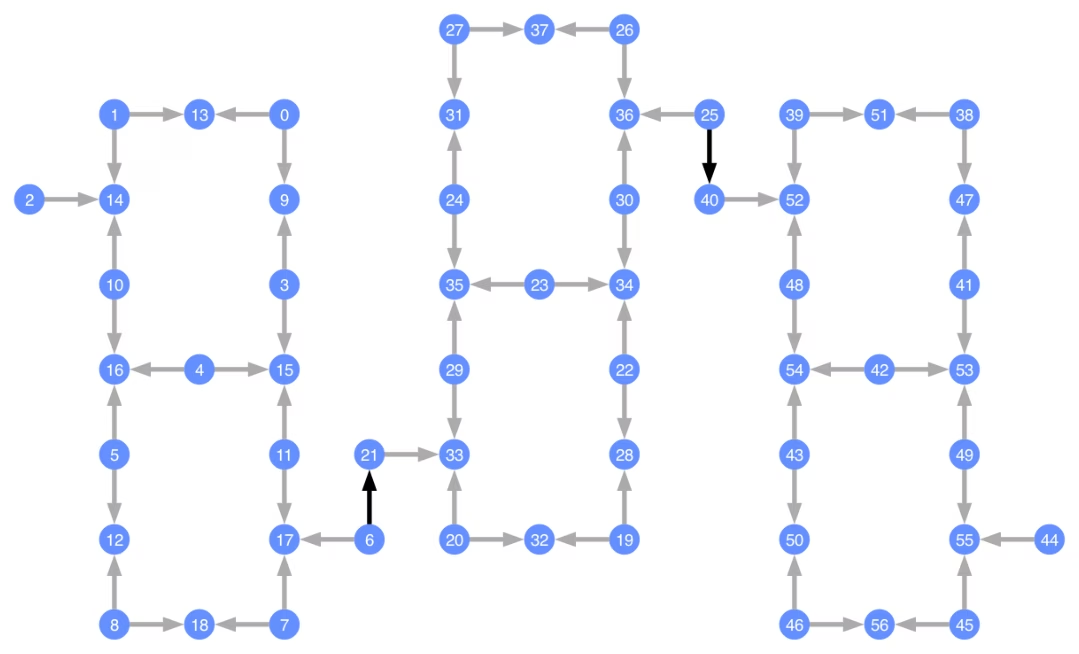
Кожен кубіт позначений, а кольорові стрілки представляють двокубітні вентилі. Сірі стрілки — це вентилі CZ, а чорні стрілки — міжкристальні вентилі CX (вони з'єднують кубіти та ). Напрямок стрілки вказує на типовий напрямок виконання цих вентилів; він визначає, які кубіти є контрольними/цільовими за замовчуванням для кожного двокубітного каналу.
Транспіляція під власні Backend-и
Тепер, коли визначено власний Backend з унікальним Target, транспілювати квантові схеми під цей Backend дуже просто — адже всі необхідні обмеження (базисні вентилі, зв'язність кубітів тощо), потрібні для проходів транспілятора, містяться в цьому атрибуті. Наступний приклад будує схему, що створює великий стан GHZ, і транспілює цю схему під побудований вище Backend.
from qiskit.transpiler import generate_preset_pass_manager

num_qubits = 50
ghz = QuantumCircuit(num_qubits)
ghz.h(range(num_qubits))
ghz.cx(0, range(1, num_qubits))
op_counts = ghz.count_ops()

print("Pre-Transpilation: ")
print(f"CX gates: {op_counts['cx']}")
print(f"H gates: {op_counts['h']}")
print("\n", 30 * "#", "\n")

pm = generate_preset_pass_manager(optimization_level=3, backend=backend)
transpiled_ghz = pm.run(ghz)
op_counts = transpiled_ghz.count_ops()

print("Post-Transpilation: ")
print(f"CZ gates: {op_counts['cz']}")
print(f"ECR gates: {op_counts['ecr']}")
print(f"SX gates: {op_counts['sx']}")
print(f"RZ gates: {op_counts['rz']}")
Pre-Transpilation:
CX gates: 49
H gates: 50

 ##############################
Post-Transpilation:
CZ gates: 204
ECR gates: 8
SX gates: 373
RZ gates: 216
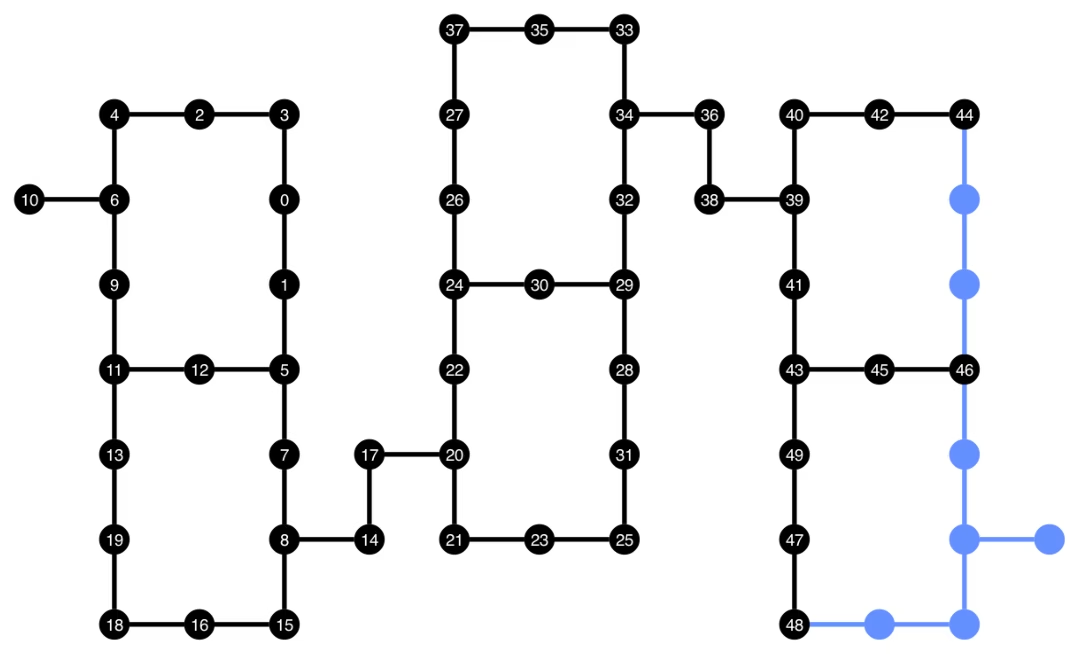
Транспільована схема тепер містить суміш вентилів CZ та ECR, які ми вказали як базисні вентилі в Target Backend. Також у ній значно більше вентилів, ніж на початку, через необхідність вставляти інструкції SWAP після вибору розміщення. Нижче інструмент візуалізації plot_circuit_layout() використовується для того, щоб показати, які кубіти та двокубітні канали були задіяні у цій схемі.
from qiskit.visualization import plot_circuit_layout

plot_circuit_layout(
    transpiled_ghz, backend, qubit_coordinates=total_qubit_coordinates
)
Створення унікальних Backend-ів
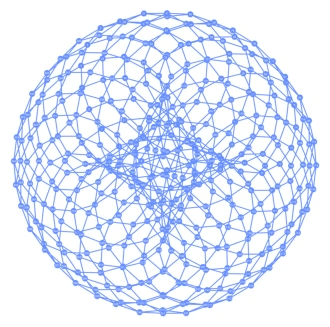
Пакет rustworkx містить велику бібліотеку різних графів і дозволяє створювати власні графи. Наведений нижче візуально цікавий код створює Backend, натхненний торичним кодом. Потім ти можеш візуалізувати цей Backend за допомогою функцій із розділу Візуалізація Backend-ів.
class FakeTorusBackend(BackendV2):
    """Fake multi chip backend."""

    def __init__(self):
        """Instantiate a new backend that is inspired by a toric code"""
        super().__init__(name="Fake LOCC backend")
        graph = rx.generators.directed_grid_graph(20, 20)
        for column in range(20):
            graph.add_edge(column, 19 * 20 + column, None)
        for row in range(20):
            graph.add_edge(row * 20, row * 20 + 19, None)
        num_qubits = len(graph)
        rng = np.random.default_rng(seed=12345678942)
        rz_props = {}
        x_props = {}
        sx_props = {}
        measure_props = {}
        delay_props = {}
        self._target = Target("Fake Kookaburra", num_qubits=num_qubits)
        # Add 1q gates. Globally use virtual rz, x, sx, and measure
        for i in range(num_qubits):
            qarg = (i,)
            rz_props[qarg] = InstructionProperties(error=0.0, duration=0.0)
            x_props[qarg] = InstructionProperties(
                error=rng.uniform(1e-6, 1e-4),
                duration=rng.uniform(1e-8, 9e-7),
            )
            sx_props[qarg] = InstructionProperties(
                error=rng.uniform(1e-6, 1e-4),
                duration=rng.uniform(1e-8, 9e-7),
            )
            measure_props[qarg] = InstructionProperties(
                error=rng.uniform(1e-3, 1e-1),
                duration=rng.uniform(1e-8, 9e-7),
            )
            delay_props[qarg] = None
        self._target.add_instruction(XGate(), x_props)
        self._target.add_instruction(SXGate(), sx_props)
        self._target.add_instruction(RZGate(Parameter("theta")), rz_props)
        self._target.add_instruction(Measure(), measure_props)
        self._target.add_instruction(Reset(), measure_props)
        self._target.add_instruction(Delay(Parameter("t")), delay_props)
        cz_props = {}
        for edge in graph.edge_list():
            cz_props[edge] = InstructionProperties(
                error=rng.uniform(7e-4, 5e-3),
                duration=rng.uniform(1e-8, 9e-7),
            )
        self._target.add_instruction(CZGate(), cz_props)

    @property
    def target(self):
        return self._target

    @property
    def max_circuits(self):
        return None

    @classmethod
    def _default_options(cls):
        return Options(shots=1024)

    def run(self, circuit, **kwargs):
        raise NotImplementedError("Lasciate ogne speranza, voi ch'intrate")
backend = FakeTorusBackend()
# We set `figsize` to a smaller size to make the documentation website faster
# to load. Normally, you do not need to set the argument.
plot_gate_map(backend, figsize=(4, 4))
num_qubits = int(backend.num_qubits / 2)
full_device_bv = QuantumCircuit(num_qubits, num_qubits - 1)
full_device_bv.x(num_qubits - 1)
full_device_bv.h(range(num_qubits))
full_device_bv.cx(range(num_qubits - 1), num_qubits - 1)
full_device_bv.h(range(num_qubits))
full_device_bv.measure(range(num_qubits - 1), range(num_qubits - 1))
tqc = transpile(full_device_bv, backend, optimization_level=3)
op_counts = tqc.count_ops()
print(f"CZ gates: {op_counts['cz']}")
print(f"X gates: {op_counts['x']}")
print(f"SX gates: {op_counts['sx']}")
print(f"RZ gates: {op_counts['rz']}")
CZ gates: 548
X gates: 139
SX gates: 871
RZ gates: 797